Olive & Thyme Seasonal food. Good company. | ||
FRESH FROM THE KITCHEN A new season. A new favorite. | ||
 | ||
| ||
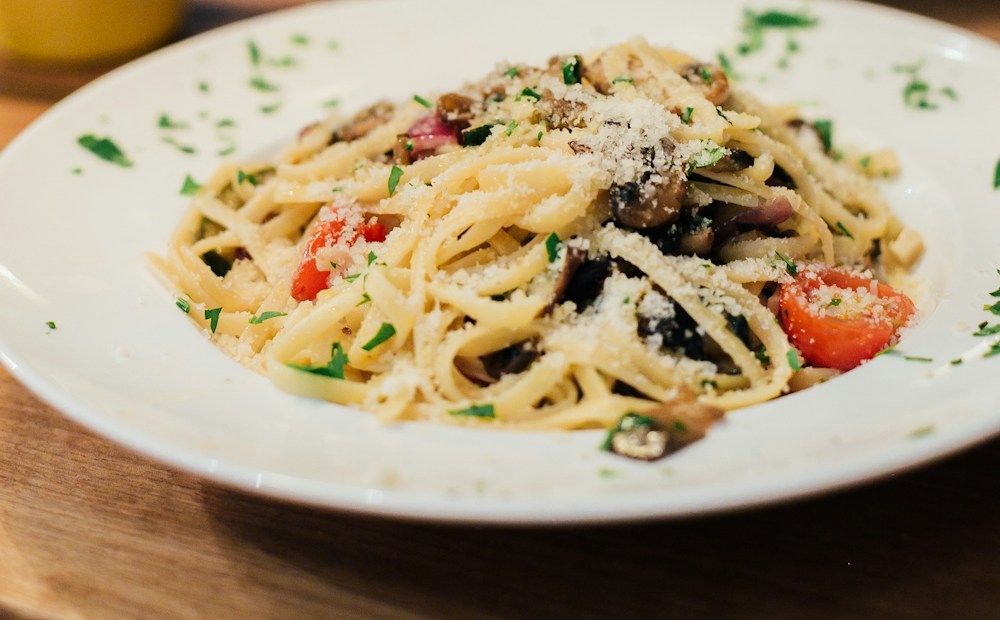
There’s something special coming out of our kitchen. Meet Wild mushroom & herb pasta — made with the season’s best ingredients and a little love from our team. A complimentary glass of wine with every main Pull up a chair. We’ve saved you a spot.
| ||
Olive & Thyme [Add your restaurant’s mailing address]Unsubscribe link: add this in your sending platform |
Restaurant email templates.
Make them yours.
Create an email for your next menu launch, special offer, or celebration. Start with an editable design, make the words and colors your own, and export HTML for your sending platform. No account needed.
What is DineLetter?
DineLetter is a restaurant email template builder for independent restaurants, cafés, and neighborhood dining spots. It gives you a starting layout and scenario-based copy, so you can spend your time on the dish, offer, or event you want guests to notice.
Each design includes a subject line, preview text, headline, message, and main button. You can edit these separately, change the visual style, and export the result. It fits the content-creation part of your workflow: your existing email service handles your subscriber list and delivery.
DineLetter at a glance
- Campaign templates
- 6 templates for seasonal menus, weekday specials, birthdays, holidays, win-back campaigns, and welcomes.
- Copy tones
- Three tones: warm, playful, and elegant.
- Preview modes
- Preview your email on desktop and mobile.
- Output options
- Download HTML or copy plain text.
- Accounts and drafts
- No account required. Saved drafts stay in this browser.
- Sending and automation
- Use your own email platform for subscribers, scheduling, and delivery.
Content updated
Learn about DineLetter →Email templates for menus,
offers, and celebrations.
Choose restaurant email templates around the reason for contacting your guests. Lead with one occasion and one useful next step, whether that is reading a menu, booking a table, or checking an offer. Here is how the six starting points differ.
Seasonal menu announcements
Introduce a new dish or seasonal menu with a specific highlight: the ingredients, preparation, or flavor guests can expect. Mention when it is available, use a current food photo, and link to the menu so readers can explore beyond the featured dish.
Start a seasonal emailWeekday specials
Make the practical details of a lunch deal or midweek offer easy to find. Include the days, service hours, price or benefit, and any restrictions. A clear booking or menu link gives guests a way to plan a visit without searching for the details elsewhere.
Share a weekday specialBirthday invitations
Explain what the birthday guest receives and how to claim it. Include the redemption window and any booking or purchase conditions. Personalize the greeting in your sending platform if it supports that feature, and make sure the offer matches what your team can provide.
Create a birthday invitationHoliday gatherings
Help guests plan ahead for a holiday meal or special event. Put the date, menu format, and reservation details near the invitation. If seating or service times are limited, explain the actual availability clearly rather than relying on a vague urgency message.
Plan a holiday emailWin-back messages
Give past guests a concrete reason to return: a new menu, a familiar favorite, or an offer you can honor. Keep the message welcoming and direct. Choose the audience in your email platform; the template itself does not identify inactive guests or schedule follow-ups.
Write a return invitationWelcome emails
Introduce your restaurant to someone who has just joined your mailing list. Share what you serve, what makes a visit distinctive, and where to find the menu or book. A first-visit offer is optional; a useful introduction can stand on its own.
Write a welcome emailHow to create a
restaurant marketing email.
DineLetter turns a restaurant occasion into an editable email. Your template opens with a subject line, message, and button ready to personalize.
- 01
Pick your occasion
Browse the library and choose the occasion that matches your message. The editor opens with sample copy and a matching visual style. Gather your dish name, offer, event date if relevant, and the destination you want the main button to open.
- 02
Add your own flavor
Add your campaign details and choose a warm, playful, or elegant tone. Generate a starting message, then edit the subject line, headline, and body in the Content tab. Use the Style tab for colors, font, and a public photo URL; check both preview widths.
- 03
Take it to your email platform
Download the design as an HTML file, or copy its plain text if you only need the wording. HTML import depends on your sending service and plan. DineLetter exports the content; your platform supplies the audience, delivery schedule, and campaign reporting.
See a restaurant email template
with your details in place.
This example turns a seasonal pasta dish and a dining offer into a focused invitation. Notice how the subject introduces the occasion, the message describes the food, and the button gives readers a single destination. The restaurant and offer are fictional sample content.
Your campaign details
- Menu highlight
- Wild mushroom & herb pasta
- Offer
- A complimentary glass of wine with every main
- Tone
- Warm & friendly
A starting point with your details woven in. Open the editor to change the copy, colors, photo, and menu link.
Example email
SubjectA fresh seasonal menu, ready for your next visit
PreviewDiscover our new pasta, made with seasonal mushrooms.
Olive & Thyme Seasonal food. Good company. | |
A new season. A new favorite. | |
| |
| |
There’s something special coming out of our kitchen. Meet Wild mushroom & herb pasta — made with the season’s best ingredients and a little love from our team. A complimentary glass of wine with every main Pull up a chair. We’ve saved you a spot.
| |
Olive & Thyme [Add your restaurant’s mailing address]Unsubscribe link: add this in your sending platform |
Make it feel like you.
Keep the layout as a starting point, then adapt it to your restaurant. Change the accent and background colors, choose a serif or sans-serif heading, and use a photo that represents the dish you will actually serve.
Check the little details.
Use the desktop and mobile views to review line breaks, paragraph length, and the main button. Save your work as a local draft when you want to return to it. These previews help with editing; your email service provides the final inbox test.
Take your email with you.
Your HTML export includes the current copy, colors, font choice, and any public image URL. Keep the file for your sending workflow, or use the plain-text output when adapting the message to an existing layout.
What belongs in a restaurant newsletter?
A useful restaurant newsletter makes the occasion clear before asking readers to act. The design provides the structure; the details you add make the message specific to your guests.
A subject and preview that work together
Name the news or offer in the subject. Use the preview text for a second useful detail, such as availability or the featured dish, instead of repeating the same sentence.
Enough detail to make a decision
Explain what is new, when it is available, and any conditions that matter. Replace sample prices, dishes, dates, and discount codes with current information. A short paragraph with concrete details is more useful than several generic promises.
One clear next step
Choose a main action that matches the message. Link a menu announcement to the current menu, or an event invitation to the relevant booking page. Check that the destination works on a phone and shows the same information as the email.
How does DineLetter work?
What kinds of restaurant emails can I create?
Start with seasonal menus, weekday specials, birthday treats, holiday gatherings, welcome emails, or a message inviting past guests back. All six templates include editable copy and design settings.
Do I need an account to get started?
No. Choose a template and start editing immediately. Brand details and saved drafts stay in this browser; they do not sync across devices.
Does DineLetter send emails for me?
No. DineLetter creates email content and exports HTML or plain text. Use your email platform to manage subscribers, add its unsubscribe link and your mailing address, and send your campaign.
Is the email copy generated by AI?
This version uses editable, scenario-based copy templates. It does not call an AI service. Review the sample dishes, offers, and wording before sending.
Can I use the exported HTML in my email platform?
The export uses table-based HTML with inline styles. Your platform needs to support HTML import. Images use public URLs, and email clients may render designs differently, so send a test from your platform first.
What should I check before sending?
Use an email platform that supports custom HTML import. Availability can depend on your platform and plan; check its current documentation. For example, see Mailchimp’s official HTML import guide.
Email clients support HTML differently, so preview and send a test through your platform. Mailchimp’s HTML email limitations explains why rendering can vary. These references are guidance, not a certification of DineLetter exports or an affiliation.
Give your next occasion
a place in their inbox.
Choose a template and make it yours. No account needed.
Make your first email